
Server Browser

Dinocity
The Volcano
Population
Loading population history...
Last 24 hours: Average players 0; recorded peak 0.
Installed Mods
21 mods
Paleo ARK - Evolution | Hard Hitting Herbivores
ID: 9505960
Moro's Indomitable Duo
ID: 9517278
AutoDoors
ID: 9418251
Stop The Steal - Ascended [UPDATE NOV 2024]
ID: 9417438Show more (17)Show less

Arkitect Structures Remastered
ID: 9487842
Additional Creatures: Paranoia
ID: 9486737
Aussie Additions Diamantinasaurus
ID: 9418115
Additional Creatures: Wild Ark
ID: 9540971
Shiny! Dinos Ascended
ID: 9524492
Castles, Keeps, and Forts - CKF
ID: 9403629
Additions Ascended: Edmontonia
ID: 9403641
Shad's Atlas Imports
ID: 9487236
Wall'n'Floor Decor
ID: 9416914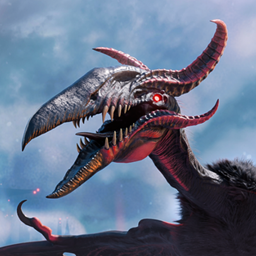
Hatzegopteryx Kukulkan
ID: 9550438
Paleo ARK - Evolution | Dangerous Depths (Crossplay!)
ID: 9505910
Paleo ARK EVO+ | Native Aquatics (Crossplay!)
ID: 9417201
Paleo ARK - Evolution | Apex Predators (Crossplay)
ID: 9505875
Moro's Livyatan (Freemium)
ID: 9517495
Feras Vanilla Edits: Smilodon
ID: 9488219
Cyrus' Dragons: Drakyros
ID: 9403925
Moro's Hydrovanta (Freemium)
ID: 9403738Other Servers In Cluster
1 serverHow to join
- Open ARK: Survival Ascended and choose Join Game.
- Select Unofficial. Enable Show Player Servers if available.
- Search for Dinocity and refresh the list.
- Select the server on The Volcano and press Join. Enter the server password if prompted. Allow the required mods to download.
Can't find the server?
Clear map and mode filters, then search for part of the name. For a password-protected server, enable Show Password Protected Servers. Check that your game is updated and your platform is listed in Server details.
Give your ARK community a home
Create your own custom server page on Arkbuddy. Share your server details, rates, events, and live population in one place.
Affiliate
Rent an ARK server on Nitrado
Launch your own world in minutes. Use the link for your game version below.